Supplier Bridge · a Shopify app by zFinia
Keep your purchase-order workflow. Get the CSV your supplier needs.
Your purchase order is already entered in Shopify. You shouldn't have to type it again just to send your supplier the file they ask for.
Supplier Bridge turns an existing native Shopify purchase order into a CSV using a saved supplier template. Choose the columns your supplier requires, put them in their order, preview the output and download the file.
Submitted for Shopify App Store review. Public installation isn't available yet.
See it working
The real app on a Shopify development store, using fictional purchase-order data.
Step 1
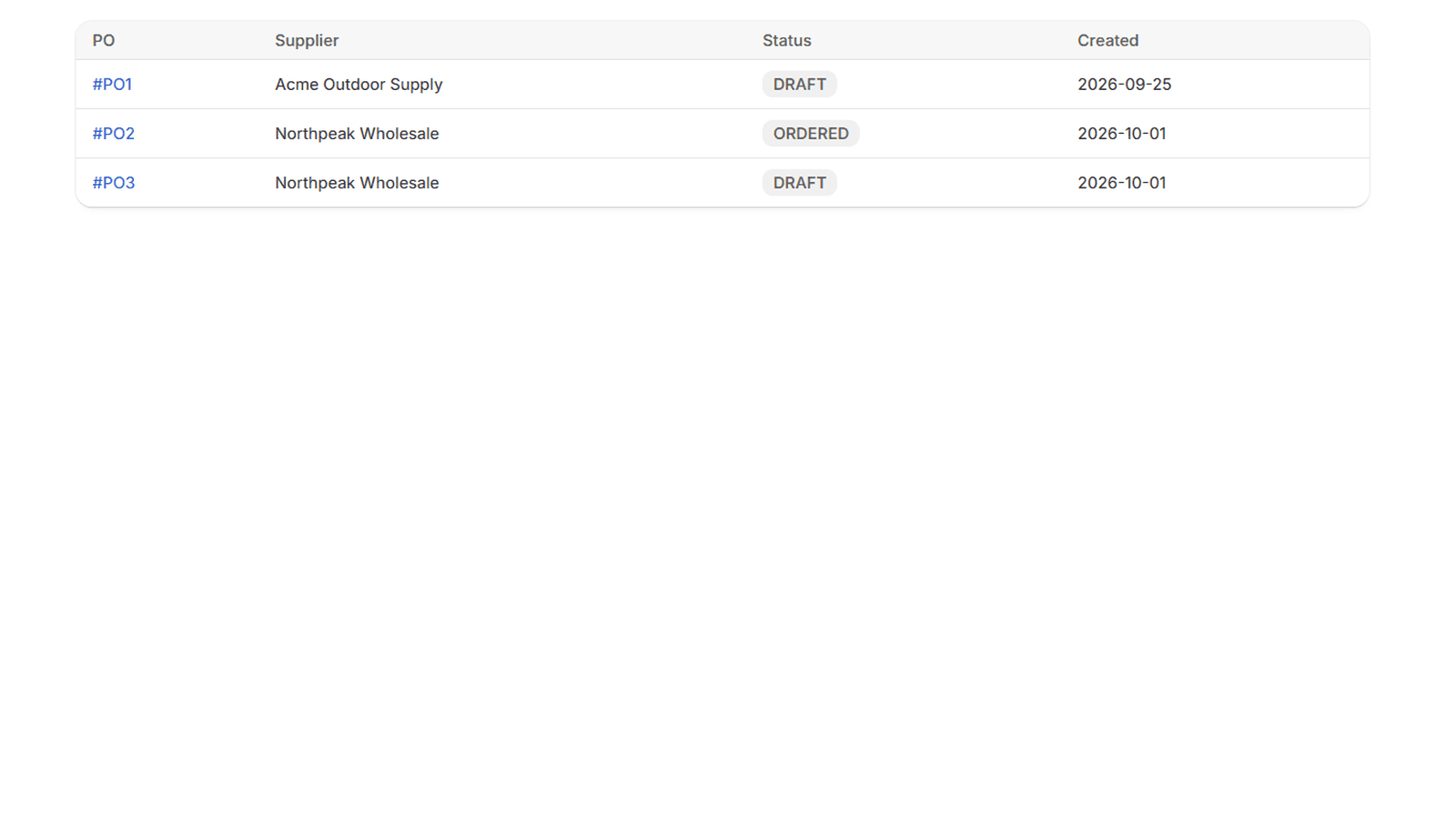
Start with the order you already created
Pick an existing purchase order from Products → Purchase orders. Supplier Bridge only handles the export step. It isn't another inventory system and doesn't ask you to rebuild your purchasing process.
Step 2
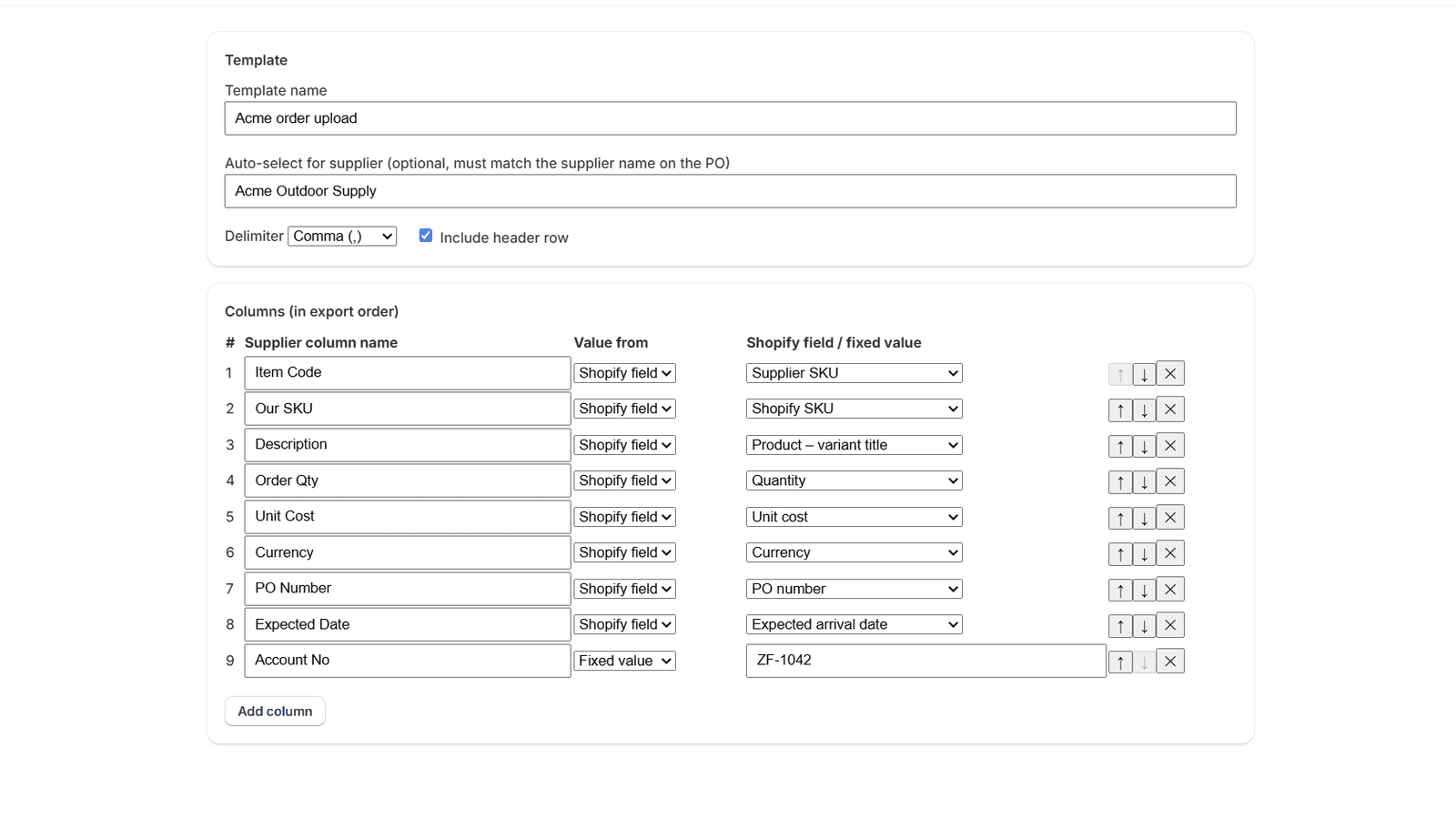
Save your supplier's layout
Name and reorder the output columns, choose which purchase-order field fills each one, add fixed values such as your account number, and pick the delimiter and whether to include a header row. Save it as a template and it can be picked automatically next time by supplier name.
Step 3
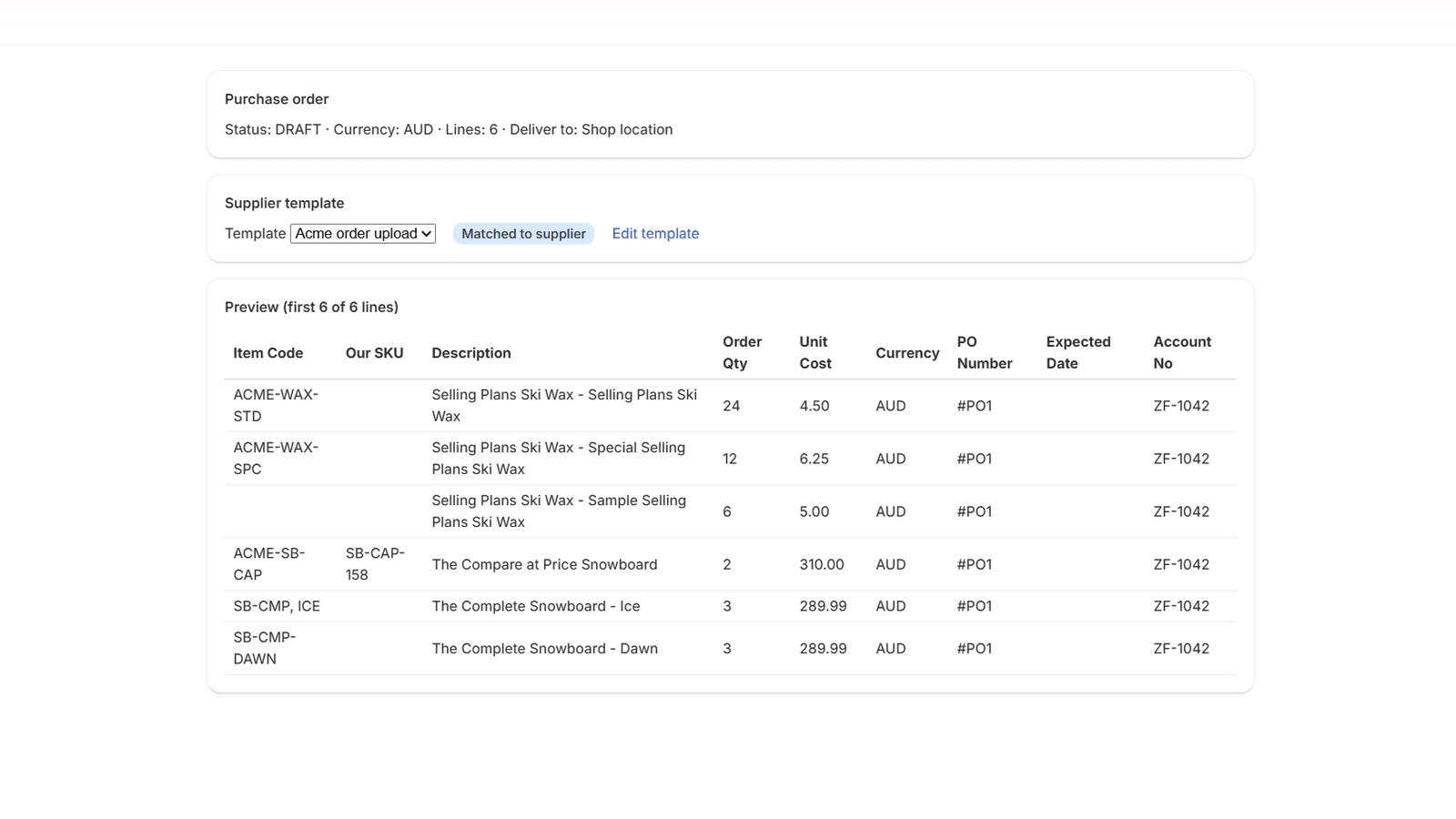
Check the file before sending
Preview the output and compare it with your supplier's current import specification. Download the CSV, then send or upload it through your supplier's normal process.
What can go in the file
- Supplier SKU and Shopify SKU
- Product title, variant title, or both combined
- Ordered quantity
- Unit cost and line total (unit cost × quantity)
- Currency
- Purchase order number and ordered date
- Expected arrival date, from the carrier's estimated arrival on a shipment for the order
- Supplier name and destination location name
- Fixed-value columns you type once, such as an account number
How the file is laid out
- Delimiter: comma, semicolon, tab or pipe
- Header row on or off
- Your column names, in your supplier's order
- Auto-select the template when the supplier name on the order matches
Pricing
Free
US$0
5 successful CSV exports in total per store. This is a lifetime allowance, not a monthly one. Supplier templates and previews are included. A failed or refused export doesn't use one.
Supplier Bridge
US$19 every 30 days
Unlimited CSV exports. Billed by Shopify, and changed or cancelled from Shopify admin.
Is it the right fit?
It is designed for merchants who:
- You already create purchase orders natively in Shopify (Products → Purchase orders).
- A supplier asks for a CSV with specific column names, order or delimiter, and you currently retype or rearrange the order to produce it.
- You order from the same suppliers repeatedly, so a saved template is reused.
What it doesn't do:
- It does not produce XLSX files. The output is CSV only.
- It is not an inventory system and does not replace one.
- It does not migrate, restore or recover historical Stocky purchase orders.
- It does not do bulk or historical purchasing reports; it exports one purchase order at a time.
- Orders up to 2,000 lines are supported. Larger orders are refused with an explanation, never silently truncated, and no export is used.
- Your supplier's own format and validation rules still apply. A downloaded file is not confirmation that your supplier's system will accept it.
Formula-like values
Supplier Bridge exports values exactly as they are in Shopify. Values that start with characters such as =, +, - or @ can be treated as formulas if the file is opened in a spreadsheet program. When an export contains such values, the app shows which cells are affected and asks you to confirm with "Download unmodified supplier CSV". The file is not sanitised, and your supplier is not warned when they open it.
Your data
Supplier Bridge asks for read-only access to purchase orders, inventory transfers, inventory shipments and inventory. It does not request access to orders or customers, and it doesn't store purchase order contents or the CSV files you download. Details are in the privacy policy.
Help with your first template
Need help setting up your first template? Email support@zfinia.com with your supplier's required column names and a redacted example of their file. Don't send store passwords, access tokens or purchasing data you don't need to share. Help is offered on a best-effort basis; we don't promise a response time or custom integration work.
Guides
- Export a native purchase order to a supplier CSV
What Shopify's native purchase orders can export today, when a supplier needs a CSV in their own layout instead, and a step-by-step workflow with a sample file, supported fields, limits and safe handling.
- Map purchase-order fields to supplier import columns
A practical checklist for matching a supplier's CSV import specification: supplier SKU versus your SKU, fixed account codes, header names, column order, delimiters, blank fields, number formats and formula risk.
- Native purchase orders after Stocky: the supplier-file step
Stocky is no longer available as of 31 August 2026. This guide covers one narrow step of the move to Shopify's native purchase orders: producing the file your supplier needs. It doesn't cover migrating historical data.
Submitted for Shopify App Store review. Public installation isn't available yet.